 |
|
|
| |
 |
|
[Math+Magic]™ Pro Edition for Adobe InDesign for Windows
|
|
MathMagic Pro Edition v8.9 for Adobe InDesign
with MathMagic Plug-ins for InDesign
New CC 2023 (64-bit versions)
CC 2022 (64-bit versions)
CC 2021 (64-bit versions)
CC 2020 (64-bit versions)
CC 2019 (32-bit & 64-bit versions)
CC 2018 (32-bit & 64-bit versions)
CC 2017 (32-bit & 64-bit versions)
CC 2015 (32-bit & 64-bit versions)
CC 2014 (32-bit & 64-bit versions)
CC (32-bit & 64-bit versions)
CS3, CS4, CS5, CS5.5, CS6
Date of Release: Nov-18-2022
|
|
Thank you for choosing MathMagic, the ultimate equation editor on the planet!
MathMagic Pro Edition for Adobe InDesign is an equation editor mainly for use with Adobe InDesign software in editing any mathematical expressions and symbols with WYSIWYG interface and various
powerful features.
|
|
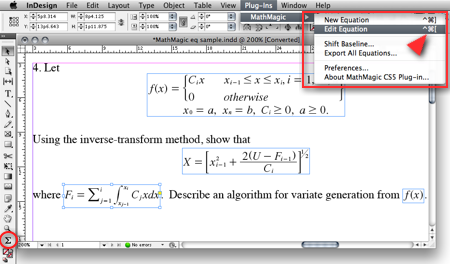
|
(InDesign window and menubar with MathMagic Plug-in menu)
|
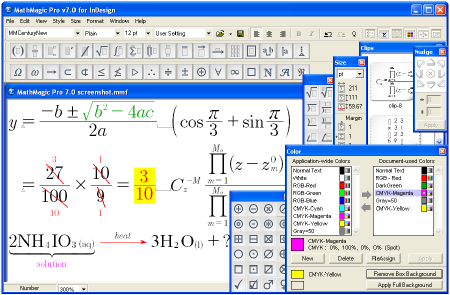
|
(MathMagic Main Editor window)
|
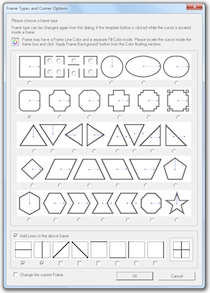
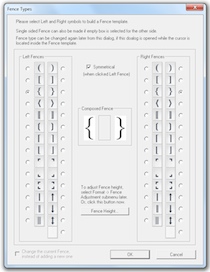
(Frame and Border Types) (Vertical Fence Types)
|
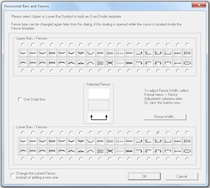
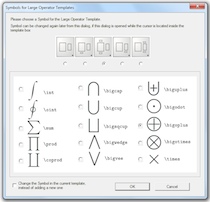
(Horizontal Fences, Decor Shapes) (Large Operator Symbols)
|
| * What's New (v8.9 - November 18, 2022) |
- Added: Supports Adobe InDesign CC 2023.
- Added: Some more fonts added for SVG embedding.
- Fixed: SVG drawing improved for a few templates.
- Fixed: Communication issue with InDesign CC 2023.
InDesign Plug-ins :
- Added: MathMagic CC2023 plug-in added for Adobe InDesign CC 2023.
|
For the full history of changes, please read the Version History file.
|
|
|
* How to Install
|
- Please read below (How MathMagic Pro works - 1. Installing) for more details.
- If installing on Windows XP,
- Download the latest Installer from download page
- Double click on the installer icon to proceed the installation
- Install MathMagic Plug-in manually, Set the path in the Preferences dialog. (read below)
- Launch MathMagic application from Windows Start menu or from the following location:
\Program Files (x86)\MathMagic Pro Edition\
|
- If installing on Windows Vista or newer,
- Download the latest Installer from download page
- Double click on the installer icon to proceed the installation.
- Install MathMagic Plug-in manually, Set the path in the Preferences dialog. (read below)
- After installation, select MathMagic application from the following location:
\Program Files (x86)\MathMagic Pro Edition\
- Right-click on it, select 'Properties'.
- Select "Windows XP SP3" compatibility mode, and turn on "Run as an Administrator" privilege.
(This is to make MathMagic read/write Registry correctly. Otherwise, Registry error message might be displayed.)
- Then, launch MathMagic application.
|
- How to install MathMagic Plug-in
- If running on Windows 7, 8 or Windows Vista, please set the Properties of your InDesign application first. This is to make InDesign appplication can talk to the external MathMagic Pro application and also let MathMagic Plug-in save the Preferences file correctly.
- right-click on InDesgin CCx.exe application, select 'Properties', from
\Program Files\Adobe\InDesign CCx.exe
- Select "Windows XP SP3" compatibility mode, and turn on "Run as an Administrator" privilege.
- The correct version of MathMagic plug-in should be manually installed by copying from
\Program Files (x86)\MathMagic Pro Edition\Plug-ins\ folder
to \Adobe\InDesign CCx\Plug-ins\ folder.
* The whole plug-in folder of "MathMagic CC20xx" should be copied, instead of copying files from inside the "MathMagic CC20xx" folder.
(If for InDesign CC2019 or older with 64-bit InDesign,
"MathMagic CCxxxx-64bit" plug-in folder should be installed, instead of 32-bit of "MathMagic CCxxxx" folder. If InDesign CC2020 or newer, only 64-bit plug-ins available.)
- Then, set the path to MathMagic Pro v8.8 InD.exe application, from the
InDesign menubar -> Plug-ins -> MathMagic -> Preferences... dialog: Click "Find" button.
|
|
|
|
|
1. Installing
- Install MathMagic Pro for InDesign for Windows using the latest MathMagic Pro installer.
- Manually install MathMagic plug-in in the following location.
- copy "MathMagic CC" or "MathMagic CSx" folder itself from
\Program Files (x86)\MathMagic Pro Edition\Plug-ins\ folder
- and paste(or simply drag&drop) it into your
\Adobe InDesign CC folder\Plug-ins\ folder
or \Adobe InDesign CSx folder\Plug-ins\ folder
- Then, launch your InDesign application. Once the MahgMagic plugin is installed and loaded correctly, you should see.
InDesign menubar -> Plug-ins -> MathMagic sub menu.
- Then, please choose : InDesign menubar -> Plug-ins -> MathMagic -> Preferences dialog: click "Find" button to select the path to the external MathMagic Pro application, which is typically
\Program Files (x86)\MathMagic Pro Edition\MathMagic Pro 8.x InD.exe
- Then, all your initial setting should be done if you are running Windows XP.
- If running on Vista or Windows 7, please read above (* How to Install) to set the Admin setting in the Properties window of both MathMagic Pro application and InDesign appliation.
- Please read the License email or ReadMe First file for more information, located in
\Program Files (x86)\MathMagic Pro Edition\ folder
2. Creating Equations
- Launch Adobe InDesign application(CSx or CCx).
- Make a new InDesign document
or open a document.
- Select the Plug-ins menu
-> MathMagic sub-menu.
- Choose "New Equation" item
to create an equation.
If the cursor is located in the text box,
the equation will be inserted in the cursor
position as an In-Line Graphic(ILG). Otherwise,
the equation will be placed as an EPS
graphic on where you click the mouse.
- You may select the Sigma
tool button from the floating main toolbar
to create an equation box, and then drag
a rectangle in the document to specify
the location of an equation once created
by the external MathMagic Pro.
- You may also right button click while the cursor is in the text box, so that you can choose the "New Equation" from the contextual menu.
- If you either select "New Equation" menu or drag a rectangle with th Sigma tool, MathMagic Pro application will be launched, if not running already, and an empty equation editor window will be opened. In case MathMagic Pro application is not launched automatically within a few seconds, please launch the application manually from the following location.
\Program Files (x86)\MathMagic Pro Edition\MathMagic Pro 8.x InD.exe
- Enter any equation in the
MathMagic editor window, and then Close(ctrl-W)
or Save(ctrl-S) the window. This will send
the equation to the InDesign document
back.
3. Editing Equations
- Choose "Edit Equation..."
item to edit the currently selected equation.
Or, just double-click on the equation
box to open it with the external MathMagic
Pro application for editing. You may also
control-click on the equation to bring
up the contextual menu, after changing
the cursor to the Arrow tool.
- After creating or editing
of equation with the external MathMagic
Pro, just press control-S and then the equation is placed in the
InDesign document.
- The baseline of all equations
will be automatically adjusted. But if
you want to lower or raise the baseline,
you may do so.
- just change the cursor
to the arrow cursor and move the equation
box by dragging to where you desire,
or
- control-click on the
equation box to bring up the contextual
menu, and then select "Shift Baseline"
item, or
- select an equation
box and choose "Shift Baseline" menu
from the MathMagic plug-in menu
4. Changing the Baseline and Bounding margins
- The baseline of all equations
will be automatically adjusted. But if
you want to lower or raise the baseline,
you may do so.
- just change the cursor
to the arrow cursor and move the equation
box by dragging to where you desire,
or
- control-click on the
equation box to bring up the contextual
menu, and then select "Shift Baseline"
item, or
- select an equation
box and choose "Shift Baseline" menu
from the MathMagic plug-in menu
- You may also customize the bounding margin gaps(left, right, top, bottom) of the equation, by specifying other value from the last item of Define Spacing window.
5. Assigning Shortcut keys to MathMagic menu items
- Install MathMagic plug-in by the instruction
- Launch InDesign application and make sure that MathMagic plug-in is loaded under Plug-Ins menu.
- Select Edit -> Keyboard Shortcuts... menu item from InDesign's menubar.
- In the "Keyboard Shortcuts" dialog, click "Product Area" popup menu, and select "MathMagic" item.
- Assign your preferred shortcut key, such as "ctrl-shift-]" for "New Equation", "ctrl-shift-[" for "Edit Equation".
|
|
| * System Requirements |
- Pentium or Faster
- Windows XP SP2 or newer including Vista, 7, 8, 10
- Adobe InDesign™ CS3 ~ CS6, CC, CC 2014, CC 2015, CC 2017, CC 2018, CC 2019, CC 2020, CC 2021, CC 2022, CC 2023
- About 60MB of hard disk space for a complete installation
- Microsoft Visual C++ 2005 SP1 Redistributable Package
|
|
|
|
* What is MathMagic, or [Math+Magic]™
|
Dreddxxx Melody Marks Link Jun 2026
Furthermore, the "Melody Marks" brand demonstrates the increasing fluidity of content consumption. In the current attention economy, popularity is a currency that translates across different mediums. Whether through viral memes, guest appearances on popular podcasts, or collaborations with mainstream influencers, Marks has become a reference point in the broader digital zeitgeist. This visibility challenges long-standing stigmas and reflects a more permissive, or at least more curious, cultural attitude toward digital creators who originated in adult-oriented spaces.
Influenced by a range of artists, including pop icons and indie darlings, Melody Marks has developed a unique sound that blends different styles and genres. Her music heroes include legendary singer-songwriters, as well as contemporary artists who have pushed the boundaries of popular music.
Because the player is complicit in the music’s creation, the melody becomes a personal memory. Those memories are then shared on Twitch, Reddit, and in cosplay meetups. This is the purest expression of , as the user becomes the bridge.
The blurring lines between alternative entertainment content and popular media carry significant cultural implications:
A significant part of her popularity stems from internet meme culture. Short clips and GIFs of her reactions—specifically her expressive facial gestures during scenes—went viral on platforms like Twitter, Reddit, and Telegram. This "meme status" turned her into a recognized face even among casual consumers of adult media. dreddxxx melody marks link
From the prehistoric campfire to the iPhone microphone, humans have used melody to remember stories. The Jaws motif tells us to fear the water; the Rocky theme tells us we can win the fight; the Game of Thrones theme tells us that winter is coming. These melodies outlive their shows, outlive their actors, and often outlive their creators. They become part of the collective unconscious of popular media.
The very fact that this keyword is being used to find a "link" to a collaboration between these two stars speaks to the distinct audiences they command:
Specific social media platforms with the highest engagement rates How algorithms influence the visibility of online content Trends in personal branding for content creators
: Marks has been identified as a valuable voice in the influencer marketing ecosystem, promoting various lifestyle and utility-based mobile apps. Because the player is complicit in the music’s
Melody Marks is an American adult film actress and model who gained massive international popularity, particularly in East Asia (Japan and Taiwan) and across the global internet community. Born in 2000, she entered the industry in the late 2010s and quickly became recognized for her distinctive "girl-next-door" aesthetic, blonde hair, and blue eyes, which contrasted with the specific genres she often filmed.
Melody Marks represents the new wave of this evolution. Instead of relying solely on traditional Hollywood gatekeepers to transition, modern creators leverage algorithmic distribution and direct-to-consumer platforms. Marks’ popularity grew during a period when the adult industry shifted toward heavily stylized, narrative-driven content that easily lends itself to internet memes and viral social media clips.
Consumers are more likely to follow, share, and discuss content created by individuals, making influencers central to popular media, according to research on influencer marketing dynamics [1].
In the attention economy, visibility is a highly valuable currency. The intersection of entertainment content and popular media creates a powerful feedback loop. High search volumes and social media engagement surrounding figures like Melody Marks signal consumer interest to algorithms, which then amplify related content across mainstream feeds. This data-driven visibility shapes online discourse, influencing what content is recommended, produced, and consumed on a global scale. Redefining Modern Celebrity This humanizes the individual
Actress * Pure Taboo. 6.6. TV Series. Claire. Frankie. 2023–2026. 2 episodes. * Vacay Vibes. Video. 2026. * A Conquest Impossible.
Mainstream YouTube commentators, streamers, and podcasters regularly feature or discuss cross-industry icons. This introduces figures like Marks to massive, general audiences who may only know them as pop-culture fixtures.
On mainstream platforms, the focus shifts from explicit material to everyday relatability. Creators share fashion choices, travel vlogs, fitness routines, and personal humor. This humanizes the individual, breaking down traditional stereotypes. Audiences begin to view them through the lens of traditional influencers, musicians, or reality TV stars. The Power of Memetic Culture
The Intersection of Digital Stardom and Mainstream Media: The Melody Marks Phenomenon |
|
|
|
| * Price |
|
|
- MathMagic Pro Edition: US$499.00
- With 2-year Free upgrade and Free tech support: $695.00
- 2-Month Subscription License: $100.00
- MathMagic Pro Edition Academic: US$299.00
- With 2-year Free upgrade and Free tech support: $399.00
|
For the full price information, please
visit our online store
or download the Price Table. |
|
Click
here to go to download page.
|
|
|
|
* History of Older Versions
|
|
|
|
|
[Math+Magic], MathMagic, MathMagic Personal Edition, MathMagic Pro Edition, MathMagic Prime Edition, MathMagic Pop Edition, MathMagic logo, InfoLogic and InfoLogic logo are trademarks or registered trademarks of InfoLogic, Inc.
MS Word, PowerPoint, Windows are trademarks or registered trademarks of Microsoft corp.
Adobe InDesign, Illustrator, Photoshop, Acrobat are trademarks or registered trademarks of Adobe Systems Inc.
Other trademarks may be the properties of their respective owners.
|
|
|
 |
Copyright 1998-2023. InfoLogic, Inc. All rights reserved.
[ We proudly develop Quality Products]SM
|
|
|
| |
|
|
|










